 ArtUp Labs
ArtUp Trace for Jira Cloud
Requirements traceability matrix for Jira
A requirements traceability matrix built from Jira's own issue links: see which requirements have no test, catch links that go stale when a requirement changes, and compare point-in-time baselines. Read-only, CSV export, no new issue types.
- Runs on Atlassian
- Free for up to 10 users
- Works with Rovo
- 26 languages, light and dark
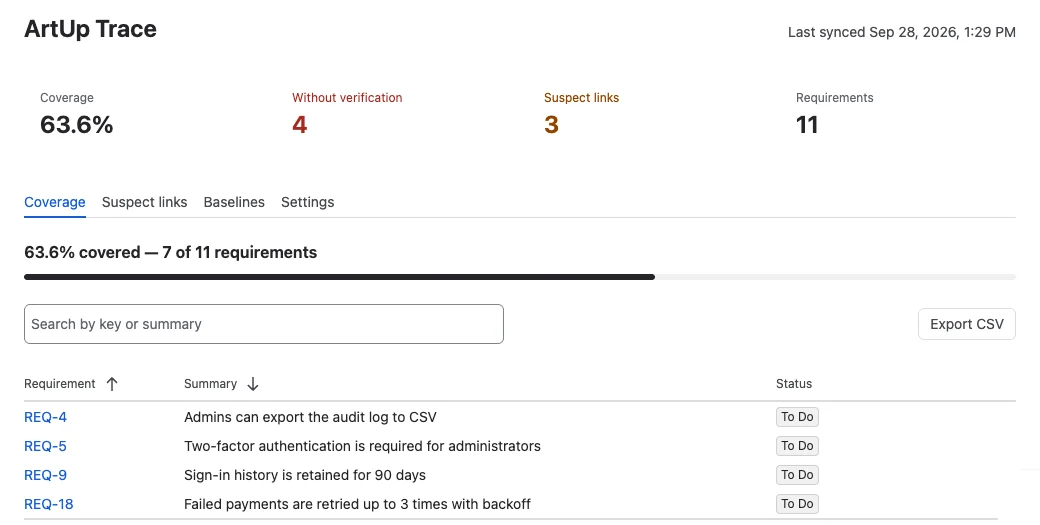
Traceability on the issue links you already have
No new issue types, custom fields or workflow changes. Pick which issue types are requirements and which verify them; a requirement is covered when it is linked to at least one verification issue through a link type you count.
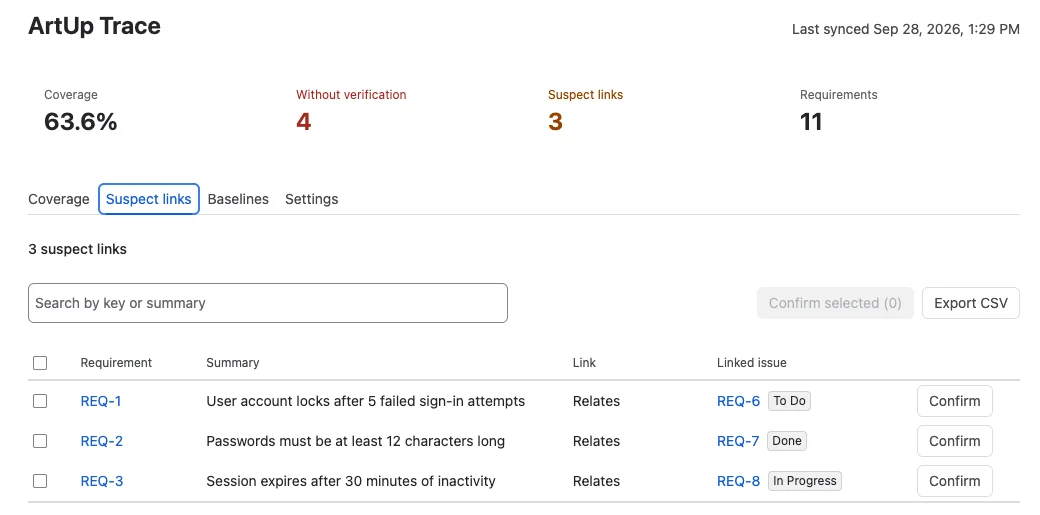
Know which tests to re-check after a requirement changes
When a requirement's summary or description changes after its link was confirmed, the link becomes suspect: the verification may no longer match the requirement.
- Changes to status, assignee or other fields do not make a link suspect.
- Confirm one link, or select several and confirm them at once.
- Confirming anchors the link to the requirement's current content.
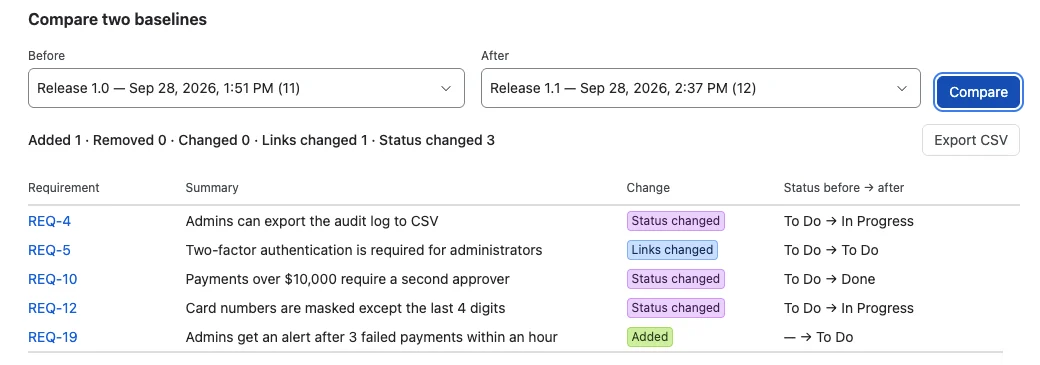
Compare requirements over time
A baseline is a named snapshot of all requirements in the project: their content, links and status at that moment — for example before a release or an audit. Compare any two and each difference is one of:
- Added or Removed — the requirement exists in only one baseline;
- Changed — its summary or description changed;
- Links changed — links were added, removed or retargeted;
- Status changed — only the status is different.
Also in the app
Evidence for audits and reviews, and answers where people already work.
- CSV exportRequirements without verification, suspect links and baseline comparisons, as a UTF-8 file that opens in Excel and Google Sheets.
- Issue panelOn each requirement: whether it is covered, its trace links with their status, and Confirm for suspect links.
- Rovo agentAsk the ArtUp Trace agent “Which requirements have no tests in PROJ?” or “What would changing PROJ-12 affect?”
- 26 languagesFollows each user's Jira language, in the light and dark Jira themes.
Set up in one minute
A project or Jira administrator tells ArtUp Trace which issue types to read. Nothing in the project changes.
- Open ArtUp Trace in a project.
After installing, choose ArtUp Trace in the project navigation and open the Settings tab.
- Pick the issue types.
Requirement types (for example Story or Requirement) and verification types (for example Test or Task). Optionally limit which link types count; empty means any link type counts.
- Save.
The first sync runs in the background; on large projects it can take up to an hour, and results appear as it runs. After that, changes to issues and links show up within a few minutes, and an hourly check catches anything missed.
What it is not
ArtUp Trace is not a test-management tool: there are no test runs or executions — if you need those, a test-management app is the right category. A link becomes suspect only when the requirement's summary or description changes. Very large CSV exports are capped, and the app tells you when only part of the rows was saved. Full documentation →
| Action | Required Jira permission |
|---|---|
| View coverage, suspect links, baselines, issue panel; export CSV | Browse projects |
| Confirm links, create baselines | Edit issues |
| Change settings | Administer projects, or Jira administrator |
Your data stays on Atlassian
ArtUp Trace is an Atlassian Forge app. It reads Jira as the current user and keeps its own records in Forge storage. There are no ArtUp Labs servers in the path.
- Runs on AtlassianNo external servers and no egress.
- Read-only in JiraNever writes to your issues. Confirmations and baselines are stored by the app.
- Your permissionsJira permissions for the project are checked on every action.
- Least privilegeScopes:
read:jira-work,read:jira-user,storage:app. - No personal data storedNo names, emails or account ids. See Privacy and Security.
Free for up to 10 users
Larger sites subscribe per user through the Atlassian Marketplace, billed by Atlassian with your other apps.