 ArtUp Labs
Published 2026-11-02 · Facts checked 2026-11-02 · By ArtUp Labs, the maker of ArtUp Release
Short answer. A Jira Cloud version (release) belongs to one project, and an issue's Fix versions can only hold versions of its own project. Plans on Premium and Enterprise can group releases from several projects, but Atlassian says these cross-space releases "cannot be saved to your issues in Jira". Without an app, create a same-named version in every project and change all of them by hand; JQL by name then finds the whole release. ArtUp Release does the copying: you change the version in one lead project, and every project of the program follows.
What Jira Cloud gives you
| Option | Plan | What you get | Where it stops |
|---|---|---|---|
| A version in each project, same name | All | Ordinary versions: Fix versions, the Releases page, boards and release notes work as usual in every project | Create, rename, date, release and archive it once per project, by hand |
JQL by name, fixVersion = "4.2.0" | All | One search over every project that has a version with that name | Matches by name: a typo or a late rename in one project drops it silently |
| Cross-space release in Plans | Premium, Enterprise | One release in the plan that groups the releases of several spaces | "Cross-space releases are only used in Advanced Roadmaps and cannot be saved to your issues in Jira. They can't be viewed or edited in spaces." |
Source: Atlassian, Create a cross-space release, checked 2026-11-02.
Atlassian's tracker shows how long this has been asked for. Votes on 2026-11-02, all three in the status Gathering Interest:
- JRACLOUD-66760 "Ability to pick Version from another Project" — 1,280 votes;
- JRACLOUD-87061 "Share Releases across Multiple projects" — 332 votes;
- JRACLOUD-42776 "Combine Release Notes from Multiple Projects" — 80 votes.
Without an app: same-named versions, kept by hand
- Agree on one name, exactly, case included:
4.2.0, notv4.2in one project and4.2.0in another. - Create the version in every project, with the same start and release dates.
- Save a filter for the whole release:
fixVersion = "4.2.0" ORDER BY project. It finds the issues of every version with that name in the projects you can browse. - On release day, release the version in each project; later, archive it in each project.
This is sound for three or four projects. It drifts with more: every rename or date change is one edit per project, and nothing shows that one copy was missed. We saw a side effect on our test site: right after a rename, a search by the old name still returned the same 880 issues 3 minutes later, so a filter by name is not proof that every project was renamed.
With ArtUp Release: one lead version, copies that follow
ArtUp Release is our Forge app for Jira Cloud. A Jira administrator groups 2 to 100 projects into a program and names one lead project. What you do to a lead version in Jira — create, rename, change its description or dates, release, unrelease, archive — is repeated in the same-named version of every member project. Teams keep using Jira's own Releases page, Fix versions, JQL and boards; the copies are ordinary Jira versions.
- In Jira settings → Apps → ArtUp Release programs, choose Create program, pick the lead project and the members.
- Preview matching shows, before anything is written, which existing versions will be linked by exact name, which will be created, and which conflict (released in one project, not in the lead). Conflicts change only if you tick Bring to lead.
- Apply. From then on, change the version in the lead project only.
Copies are linked to the lead version by id, so a rename does not break the link. An hourly check brings back a copy someone edited by hand; a daily check covers released and archived versions. The app never changes the issues in a version and never deletes a version on its own.
Measured On 2026-10-21, on our test site, a program of 50 company-managed projects: 5 rounds of create, rename, release and archive in the lead project, 980 copies in total. All 980 arrived; p50 6.8 seconds, p90 7.7 seconds, slowest 36.2 seconds. In a second run, 150 changes in 474 seconds, with a burst of 10 new versions in 54 seconds, left no lost change and no duplicate version name. Speed depends on Jira's queues and on your site's request limit; we promise "usually seconds, up to a few minutes".
Seeing the whole release
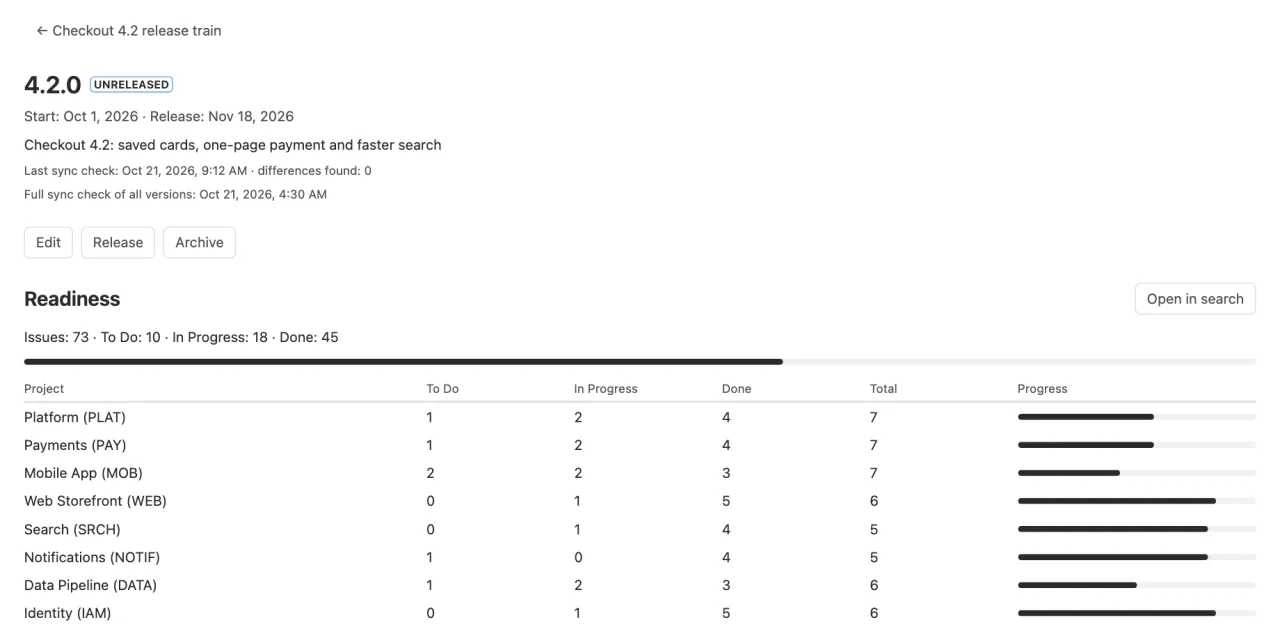
The version page in Apps → ArtUp Release counts the issues of the lead version and all its copies by status category, with a table by project. Open in search opens them in Jira's issue navigator by version ids, so a renamed copy is not missed. Numbers are read as the user: projects they cannot browse show No access instead of counts.
Release notes for the whole program, and a snapshot of the release's issues taken when you press Release, are in the next guide: release notes from several Jira projects.
Limits
- 2 to 100 projects per program, the lead included; a project belongs to one program. The lead cannot be changed; delete the program and create it again (matching by name links the versions again).
- Only versions sync: not components, project categories or the order of versions.
- Deleting or merging a lead version does not delete its copies; the program page offers to delete them, with a choice of where their issues go.
- The app needs Browse projects and Administer projects in each project. Jira Cloud only; company-managed and team-managed projects both work.
One release across your Jira projects
ArtUp Release keeps the versions of every project in a program in step with one lead project, shows readiness by project, and makes release notes in Markdown, Word and PDF.
ArtUp Release is on the Atlassian Marketplace. Sites with up to 10 users use it free.