 ArtUp Labs
Published 2026-11-02 · Facts checked 2026-11-02 · By ArtUp Labs, the maker of ArtUp Release and ArtUp Reports
Short answer. Jira's release notes cover "all the work items within a version", and a version belongs to one project, so each project gives its own notes. Atlassian's suggestion to combine them, JRACLOUD-42776, has 80 votes and is Gathering Interest. Without an app, paste the notes of each project into one page. With a same-named version in every project, one JQL search over all of them can be exported as one Word or PDF file. ArtUp Release makes notes for the whole program version in Markdown, Word and PDF, and after the release builds them from a snapshot, so they stay as shipped.
What Jira Cloud gives you
| Jira's release notes | |
|---|---|
| Where | Releases → the version → Release notes, created in Jira, in Confluence (same site), or as a draft with Rovo |
| Scope | "All the work items within a version" — one version of one project; Atlassian's article does not describe several versions or projects |
| Out of Jira | Copy as Markdown or HTML, save to the version's related work, or publish a Confluence draft page; panels, dates, expands and statuses copy only as HTML |
| Limits | "Media such as images, videos, and other files, are not yet supported" |
Sources: Atlassian, Create release notes; JRACLOUD-42776 Combine Release Notes from Multiple Projects; both checked 2026-11-02.
Three ways to one document
| Way | How | What to watch |
|---|---|---|
| Paste per project | Create release notes in each project's version, copy as Markdown or HTML, combine in Confluence or a document | One round per project, every release; a later change in Jira is not reflected |
| One search, one export | Same version name in every project; search fixVersion = "4.2.0" AND statusCategory = Done; export the result with the Release notes layout of ArtUp Reports (Word or PDF, grouped by issue type) | Depends on the names being identical; the file is built from the issues as they are now |
| Program release notes | In ArtUp Release, open the program version → Release notes → Markdown, Word or PDF | Needs a program (a lead project and its members); see one release across multiple projects |
Release notes for a program version in ArtUp Release
- Open Apps → ArtUp Release, the program, and the version.
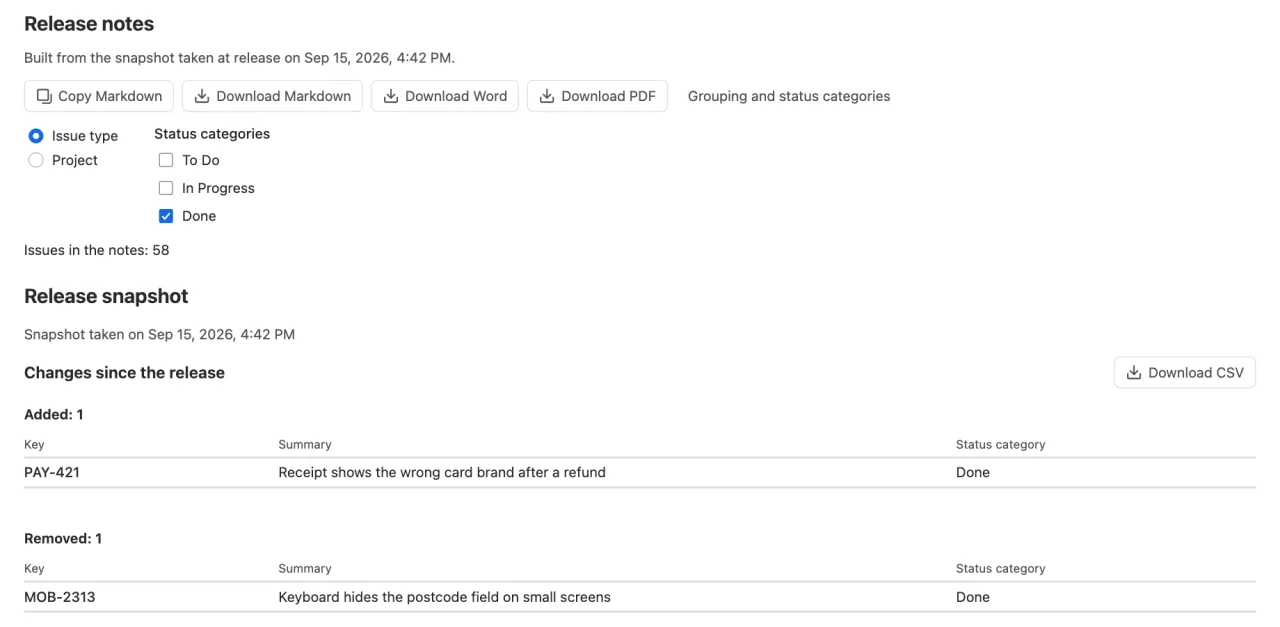
- Under Release notes, choose the grouping — Issue type (default) or Project — and the status categories to include (Done by default).
- Choose Copy Markdown, Download Markdown, Download Word or Download PDF.
The document holds the program, the version with its dates and status, a summary by project (issues and Done), and per group a table of key, summary, type and project. Word and PDF are made in your browser with one built-in layout; headings follow your Jira language.
Notes that stay as shipped
Release notes made from a search change when someone moves an issue to the next version or reopens it a week later. ArtUp Release takes a snapshot of the release's issues across all projects when the program version is released: key, project, type, summary and status category. Notes of a released version are built from that snapshot ("Built from the snapshot taken at release on …"). Changes since the release lists what was added, removed or moved to another status category since then, and downloads as CSV.
Measured On 2026-10-21, on our test site, a program version over 50 projects held 529 issues; the app's count and all 50 project rows matched a Jira search/jql by version ids, and so did a snapshot of 5 projects taken the day before.
Limits
- One built-in Word and PDF layout; no custom templates and no publishing to Confluence. For your own Word template, export the release's JQL with ArtUp Reports instead.
- The notes list key, summary, type and project; other fields and images are not included.
- A version released before the app was installed has no snapshot; its notes use the current issues.
- Each person sees only issues they can browse; snapshot rows they cannot see are hidden and counted.
One set of release notes for many projects
ArtUp Release keeps a release in step across your Jira projects and makes its notes in Markdown, Word and PDF from a snapshot taken at release.
ArtUp Release is on the Atlassian Marketplace. Sites with up to 10 users use it free.